Master Email Deliverability in 2025: The Ultimate Guide to Inbox Placement
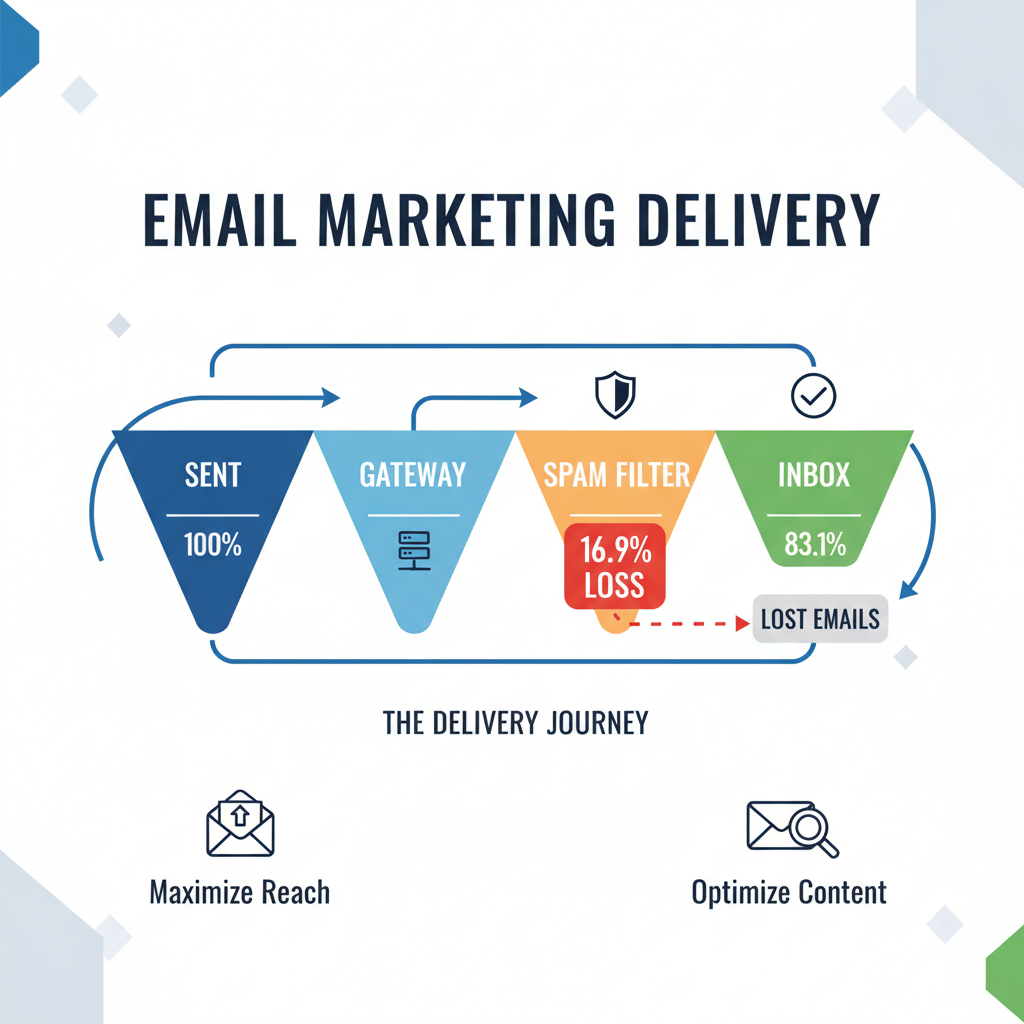
Did you know that hitting "send" is essentially a gamble in today's digital landscape? It sounds dramatic, but the data backs it up. According to the 2024 Email Deliverability Benchmark Report by Validity, 16.9% of all emails never reach the intended recipient's inbox. That is nearly one in six messages vanishing into the ether or the spam folder.
In my decade of experience helping brands optimize their outreach, I've seen the panic that sets in when open rates plummet overnight. But here is the thing: in the post-2024 landscape, deliverability isn't about luck. It is about engineering.
Following the massive Email Sender Guidelines update from Google in February 2024, the rules of the game have fundamentally changed. If you are not proactively managing your technical infrastructure, you aren't just missing out on revenue—you are risking a domain block.
This guide is your definitive resource. We will cover the mandatory Google/Yahoo updates, the new BIMI standards, and the exact technical steps to keep your spam rate in the safe zone.
The New Rules of the Inbox (The Feb 2024 Mandate)
To really improve email deliverability rates, you have to understand who holds the keys to the castle. Right now, that is Google and Yahoo. In early 2024, they stopped asking nicely and started demanding compliance.
Understanding the 0.3% Spam Rate Threshold (The "Death Zone")
If you take nothing else from this article, memorize this number: 0.3%.
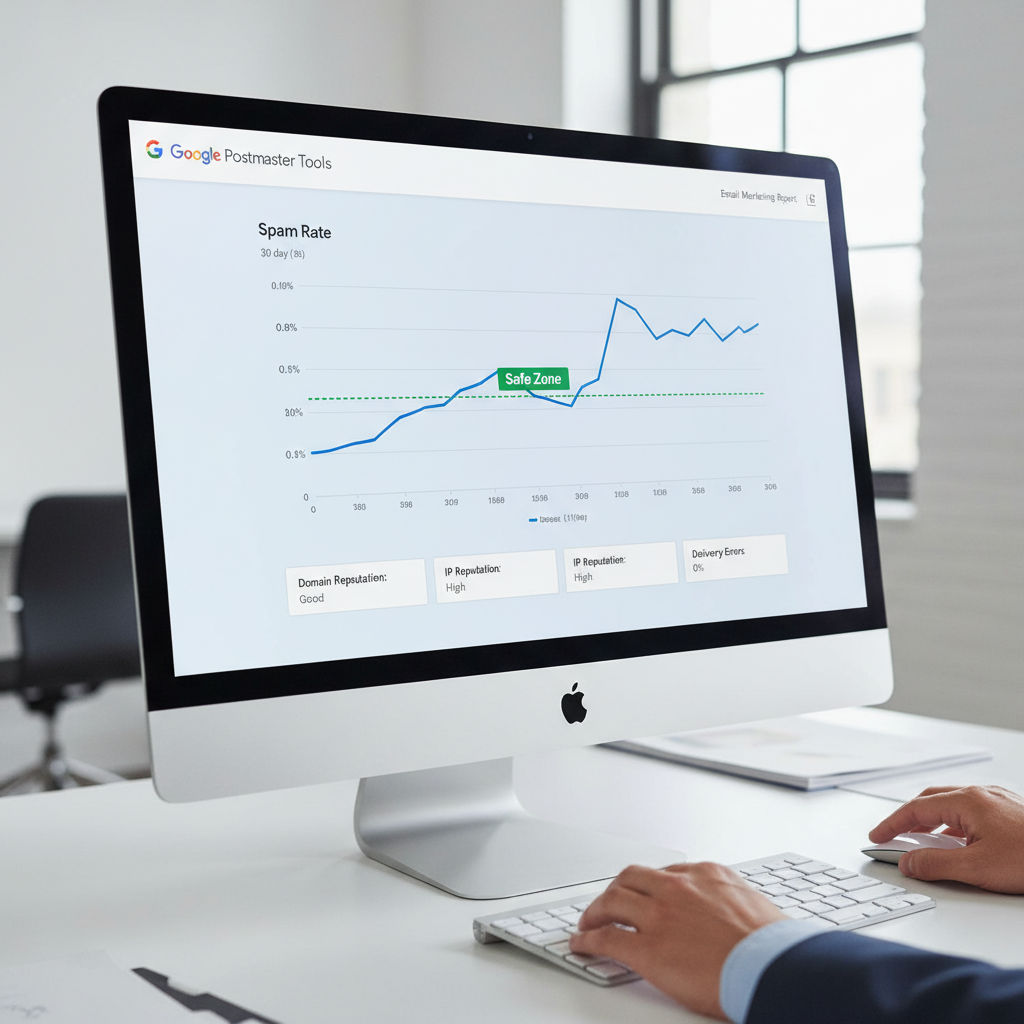
According to Google's 2024 Sender Guidelines, bulk senders must keep their spam rate reported in Postmaster Tools below 0.3%. If you consistently hit this threshold, Google may block your domain entirely. In my experience, recovering from a domain block is ten times harder than preventing one.
Mandatory Authentication: The Holy Trinity
Gone are the days when SPF (Sender Policy Framework) was enough. The new mandate requires robust authentication. According to IO Digital Experts, strict adherence to these protocols is now the baseline for entry into Gmail inboxes.
- SPF: The guest list. It tells the server which IPs are allowed to send mail for you.
- DKIM (DomainKeys Identified Mail): The wax seal. It adds a digital signature to verify the email wasn't tampered with.
- DMARC (Domain-based Message Authentication, Reporting, and Conformance): The instruction manual. It tells the receiving server what to do if SPF or DKIM fails.
The One-Click Unsubscribe Requirement
You must make it easy to leave. Google now mandates one-click unsubscribe functionality for bulk senders (defined in RFC 8058). If your subscribers have to hunt for the exit, they will mark you as spam instead. It’s a simple equation: make leaving easy, and your complaint rate stays low.
Technical Infrastructure: Building a Trusted Foundation
Proactive steps start with your server architecture. You can write the best copy in the world, but if your DNS records are messy, no one will read it.
Auditing Your DNS Records
I frequently audit client accounts where the SPF record is broken because too many tools are authorized (the "10 lookup limit"). Use tools like MXToolbox or Google Admin Toolbox to verify your syntax.
Furthermore, simply having a DMARC record isn't enough. As Brian Westnedge from Red Sift notes in a recent 2025 analysis, "Simply having a DMARC record isn't enough. You need full alignment, proper enforcement, and real-time visibility across every platform." This means moving from a policy of p=none (monitoring) to p=quarantine or p=reject.
IP Warming Strategy: The 4-Week Ramp Up Plan
If you are moving to a new dedicated IP or a new Email Service Provider (ESP), you cannot just blast your whole list on day one. You need to "warm" the IP to establish a reputation.
Here is the schedule I recommend to my clients:
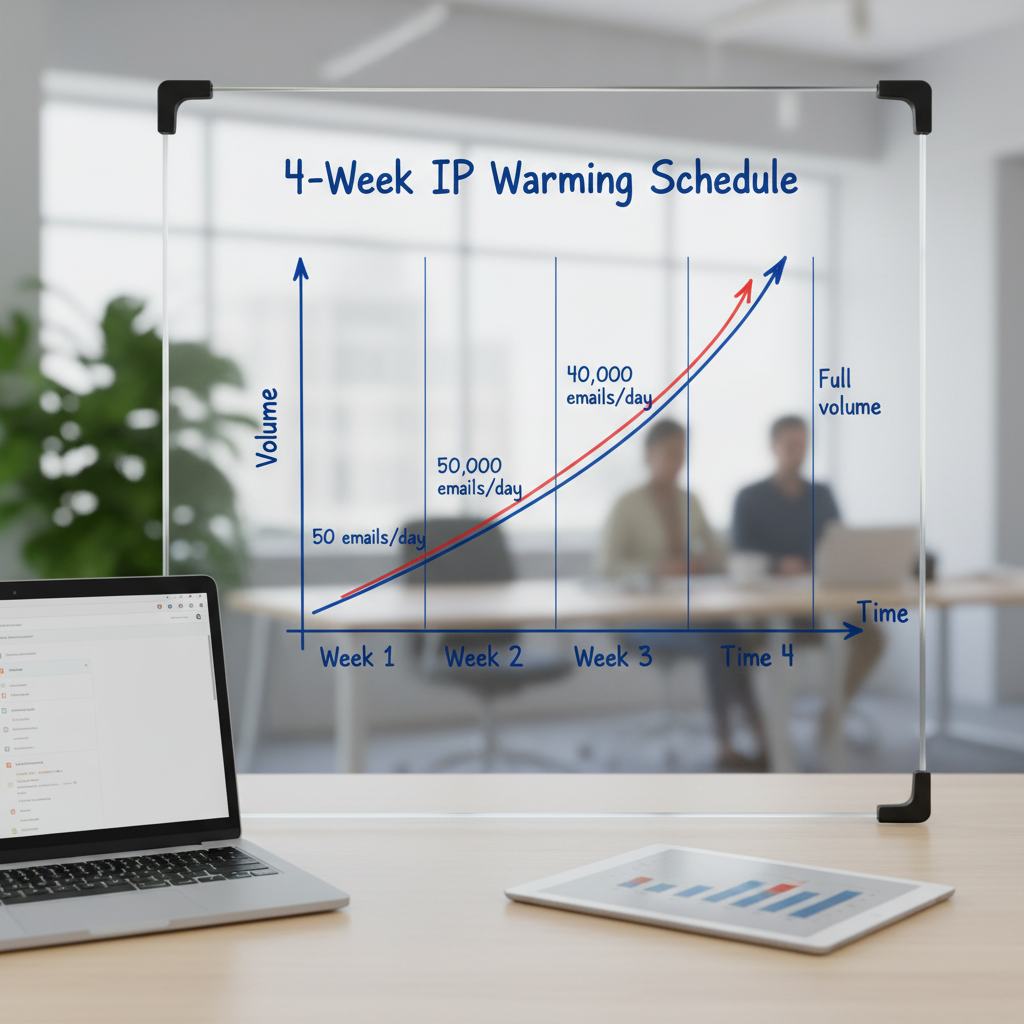
- Week 1: Send only to your most engaged users (those who opened in the last 30 days). Keep volume under 100/day.
- Week 2: Expand to 60-day actives. Increase volume to 500-1000/day.
- Week 3: Expand to 90-day actives.
- Week 4: Full list send (excluding inactive contacts).
BIMI, VMC, and the New CMC: Getting Your Logo in the Inbox
Brand Indicators for Message Identification (BIMI) allows you to display your logo next to your message in the inbox. It’s a massive trust signal. According to Red Sift and Yahoo data, brands with verified logos saw a 39% increase in open rates.
The 2025 Game Changer: Previously, you needed a Verified Mark Certificate (VMC), which required a registered trademark and cost ~$1,500/year. However, recent updates now pave the way for Common Mark Certificates (CMC), which allow logo display without a registered trademark in some contexts. This democratizes deliverability for smaller businesses.
Be careful, though. Implementation is tricky. URIports' Jan 2025 analysis found that 53.6% of BIMI-enabled domains had implementation errors.
List Hygiene: The Silent Killer of Deliverability
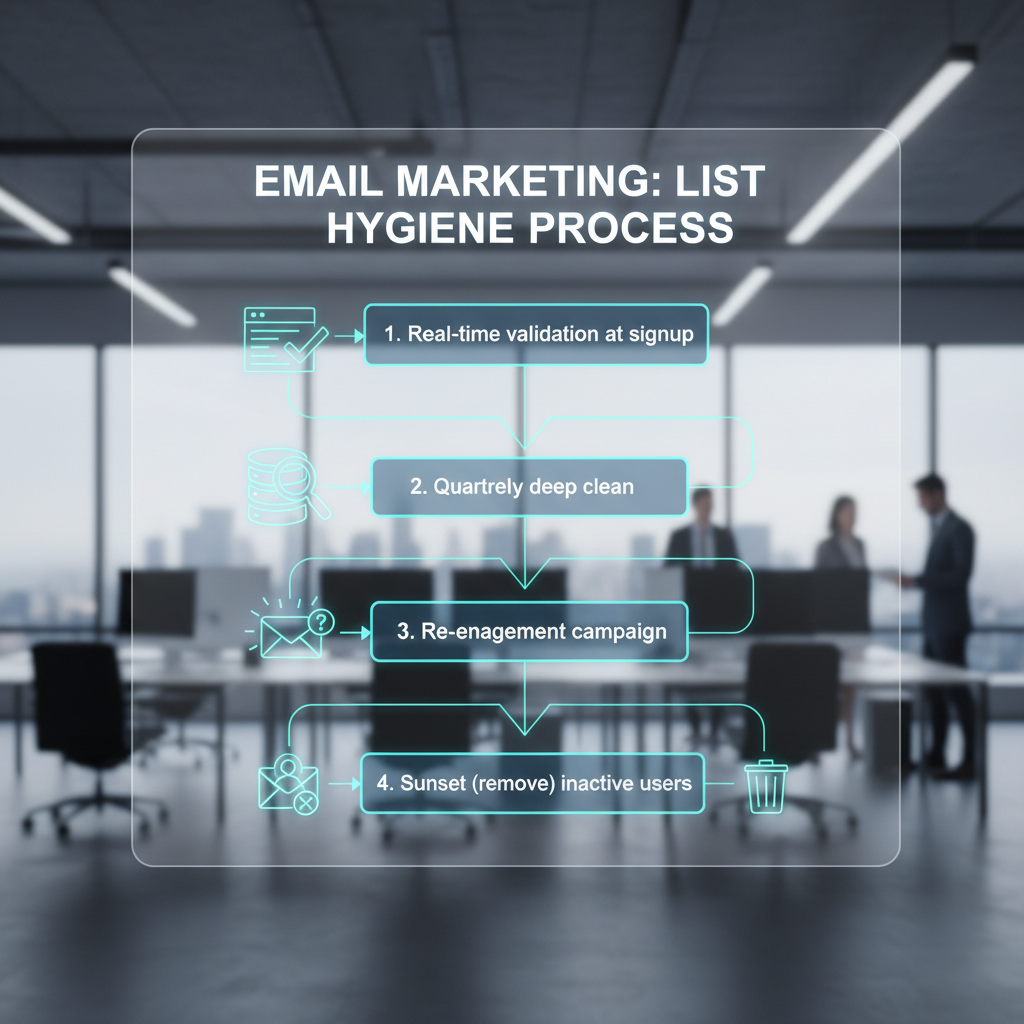
I often tell clients that an email list is like a garden—if you don't weed it, it dies. Keeping dead emails on your list artificially lowers your engagement rates and risks hitting spam traps.
Managing "List Decay"
According to ZeroBounce's Feb 2025 Email List Decay Report, at least 28% of an email list decays within just one year. People change jobs, abandon accounts, or switch providers.
"Reaching the inbox has become increasingly difficult... poor-quality data is the biggest culprit. Invalid emails bounce and taint sender reputation."
— Liviu Tanase, CEO of ZeroBounce (Source)
Identifying Spam Traps & Catch-all Addresses
Spam traps are email addresses created solely to catch senders who aren't following best practices. They don't belong to real people. Hitting one is a major red flag to ISPs.
Even more common are "Catch-all" addresses (e.g., accepting any email sent to @company.com). ZeroBounce reported over 1 billion catch-all emails detected in 2024. These are risky because they might accept the email initially but bounce it later, or they might turn into spam traps.
Content & Engagement: Signals that Matter to AI Filters
Once your technical infrastructure is sound and your list is clean, the content itself dictates your fate. Spam filters now use AI to analyze engagement, not just keywords.
Why "Open Rates" are Dead & What to Track Instead
Since Apple’s Mail Privacy Protection (MPP) launched, "Open Rate" has become a vanity metric. Apple pre-loads images, making it look like 100% of their users opened your email.
In 2025, you must pivot to Clicks-to-Open Rate (CTOR) and Reply Rate. A reply is the strongest signal of trust a user can give. Encourage replies by asking questions.
Formatting for Mobile: The 67% Rule
If your email looks bad on a phone, it gets deleted. The 2025 Email Statistics Report from ZeroBounce highlights that 67% of consumers prefer short, concise emails.
Keep your HTML code clean. Avoid heavy image-only emails, which trigger spam filters. Aim for a 60/40 text-to-image ratio.
Personalization: The ROI Engine
Generic blasts are flagged as "Promotions" or spam. Personalization is the antidote. HubSpot's State of Marketing Report 2024 indicates that 96% of marketers say personalization leads to repeat business.
However, be wary of relying solely on Generative AI for this. Chad S. White, Head of Research at Oracle/Litmus, noted in the 2024 State of Email Trends that respondents rated generative AI lower for copy than traditional tactics. Use AI to assist, but keep the human touch.
Monitoring & Recovery
You can't fix what you don't measure. If you are serious about this, you need the right tools.
Using Google Postmaster Tools
This is the only source of truth for Gmail deliverability. It provides data on:
- Spam Rate (Keep it under 0.1% for safety, strictly under 0.3%).
- IP Reputation (Aim for "High").
- Domain Reputation.
How to Get Delisted from Blacklists
If you find yourself on a blacklist (check via Spamhaus or Sorbs):
- Stop sending immediately.
- Identify the cause (usually a spam trap hit or a compromised account).
- Fix the security gap.
- Submit a delisting request to the blacklist operator. Be honest about what happened and what you fixed.
Frequently Asked Questions
You should aim for 95% or higher. While the global average is roughly 83.1% according to Validity, a healthy list with proper hygiene should easily surpass 95%. If you are below 90%, you have a serious problem.
First, implement a one-click unsubscribe header. Second, clean your list of inactive subscribers (those who haven't opened in 6 months). Third, ensure your content matches what the user signed up for. Bait-and-switch tactics are the fastest way to get flagged.
Yes, but only if enforced. A DMARC policy of p=none does nothing for your reputation. Moving to p=reject prevents spoofing, which protects your domain reputation and signals to Google that you are a verified sender.
A hard bounce is a permanent error (invalid email, domain doesn't exist). You must remove these immediately. A soft bounce is temporary (inbox full, server down). Most ESPs will retry soft bounces 3 times before converting them to a hard bounce.
Perform a light clean (removing hard bounces) after every campaign. Perform a deep clean (removing inactive users and validating existing emails) at least once per quarter to combat the 28% annual decay rate.
Conclusion: The Reputation Economy
Improving email deliverability rates is no longer about "tricking" the spam filter. It is about proving you are a legitimate business sending valuable content to people who asked for it.
The 2024/2025 updates from Google and Yahoo have shifted email marketing into a reputation economy. If you respect the inbox—by authenticating your domain, cleaning your data, and honoring unsubscribes—you will be rewarded with visibility.
Don't wait for your open rates to crash. Audit your DMARC status and check your Google Postmaster Tools spam rate today. The health of your business depends on it.