Steps to Set Up Your First Automated Marketing Sequence
I remember the first time I tried to manage email follow-ups manually. I had a spreadsheet open on one screen and my email client on the other. I spent three hours copying and pasting messages to new leads. I missed two potential clients because I simply forgot to email them on time.
I realized I couldn't scale my business this way. If you are stuck doing manual tasks, you are losing money. The solution is setting up your first automated sequence.
This isn't about removing the human touch. It's about using technology to deliver the right message at the exact moment your customer needs it. In this guide, I will walk you through the technical steps to build a reliable marketing automation workflow. I'll cover the logic, the tools, and the safety checks I use to make sure everything runs smoothly.
Definition of an Automated Sequence
Let's keep this simple. An automated sequence is a series of emails that send automatically based on a user's action. Unlike a newsletter, which you send to everyone at once, a sequence is personal. It runs on a schedule you define.
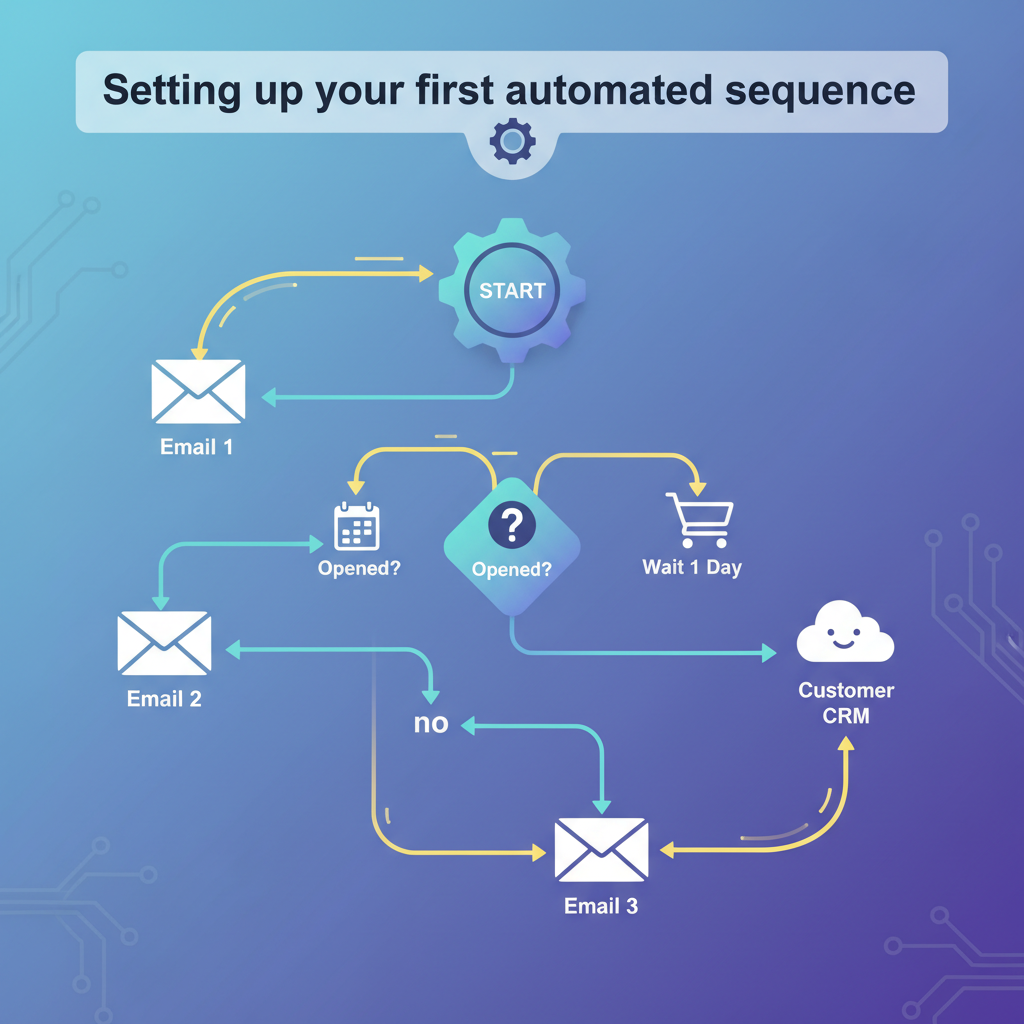
Technically, it works like a flowchart. You tell the software: "If a person does X, then wait two days and send email Y."
This runs in the background 24/7. Whether you are sleeping or in a meeting, your marketing technology stack is nurturing leads for you. I consider this the foundation of a modern sales funnel.
Requirements for Marketing Automation
Before you build anything, you need the right tools. I've tested over a dozen platforms, and I learned that not all of them handle automation well.
Software Selection Criteria
You need a tool that supports visual workflows. Avoid platforms that only offer basic "autoresponders." You want a "workflow builder." Look for these three features:
- Visual Canvas: You should be able to drag and drop steps to see the customer journey.
- Tagging: The tool must let you add "tags" to users (like "Customer" or "Lead").
- Reliable Delivery: If the tool has a bad reputation, your emails will hit the spam folder.
According to HubSpot Research, 76% of companies now use automation. If your current email provider doesn't offer these features, I recommend switching before you start.
Data Collection and List Segmentation
Your automation is only as good as your data. You cannot target a sequence correctly if you don't know who is joining your list. I always set up my opt-in forms to collect the source of the lead.
For example, if someone joins via a "Discount" popup, I tag them as "Price Sensitive." If they join via a generic newsletter form, I tag them as "General Interest." This allows me to send different sequences to different groups.
< figure class="article-image-container" >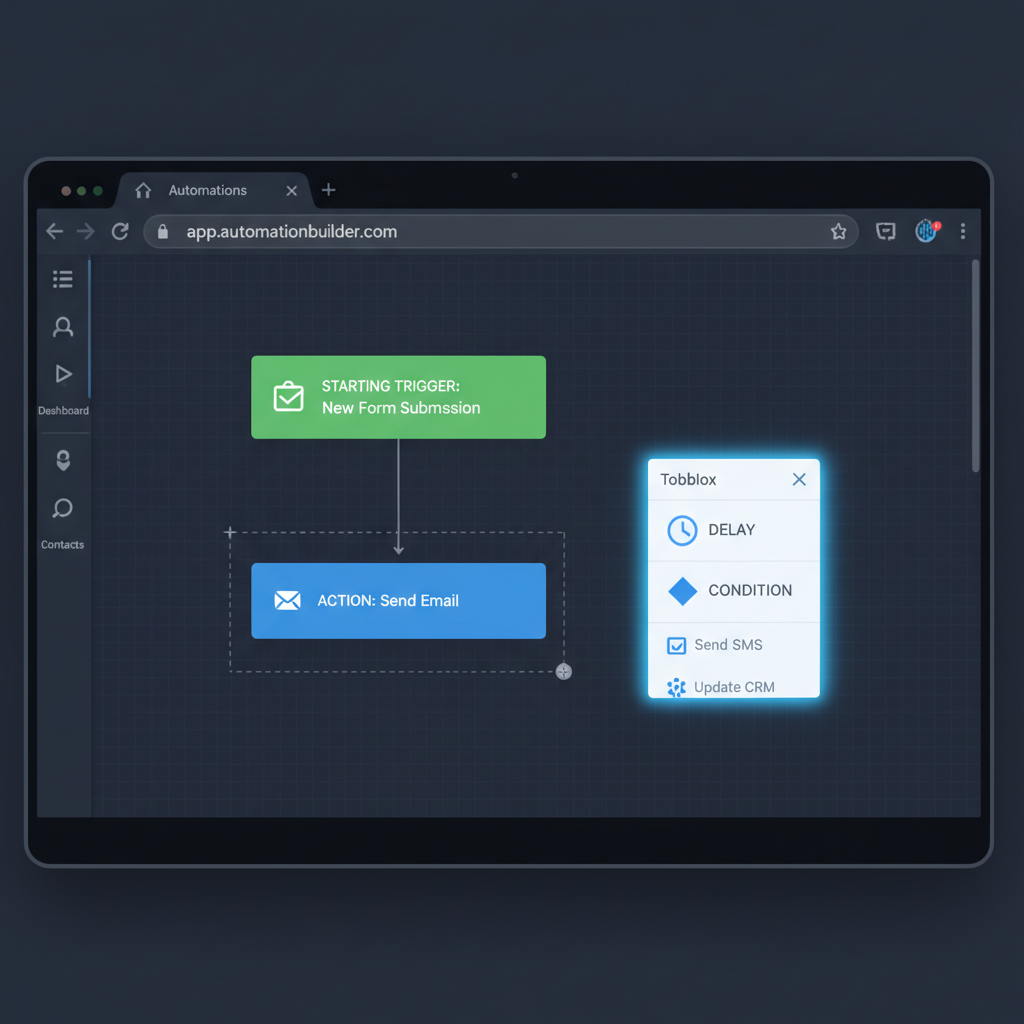
Steps to Design the Sequence Logic
This is where many people get confused. I like to draw my logic on paper before I touch the software. It saves me time later.
Selecting a Starting Trigger
Every sequence needs a "Trigger." This is the event that pushes the start button. If you choose the wrong trigger, the wrong people will get your emails. Common triggers include:
- Form Submission: Someone fills out a contact form.
- Tag Added: A specific tag is applied to a contact profile.
- Page Visit: A user visits a pricing page (requires website tracking).
- Date Field: A birthday or anniversary.
I usually start with a "Form Submission" trigger for beginners. It is the most reliable method.
Setting Time Delays Between Actions
You shouldn't send five emails in one day. I made this mistake once, and my unsubscribe rate skyrocketed. You need to let the user breathe. Here is the cadence I use for a standard welcome sequence:
- Email 1: Send Immediately (Deliver the value/lead magnet).
- Email 2: Wait 1 day.
- Email 3: Wait 2 days.
- Email 4: Wait 3 days.
This pacing keeps you top-of-mind without being annoying.
Implementing Conditional Logic and Branching
This is my favorite part. "Branching" lets you split the path. You can ask the system to check a condition before sending the next email.
For instance, I often use a "Did they open the last email?" condition.
- If YES: Send them a pitch for a product.
- If NO: Send a follow-up with a different subject line to try again.
This logic ensures you aren't pitching to someone who hasn't even read your welcome message. It makes the sequence feel smarter and more personal.
Writing Content for Automated Emails
The tech is important, but the words sell the product. I treat automated emails differently than newsletters. They need to be shorter and more direct.
Personalization Techniques for Automation
Please don't stop at "Hi {First Name}." That is the bare minimum. I use personalization tags to reference what they signed up for.
If they downloaded a guide on "Gardening," my email body says, "I hope you are enjoying the Gardening guide." Forrester research shows that personalized sequences can increase conversion rates by 10%. I've seen it go even higher when the content matches the user's specific interest.
Subject Line Requirements for High Open Rates
Your subject line is the gatekeeper. Since these emails send automatically, you can't rely on "trending topics." You need evergreen subject lines. I avoid clickbait. I prefer clarity.
Bad: "You won't believe this!"
Good: "Here is the PDF you requested"
Data from Epsilon shows that triggered emails have a 70.5% higher open rate than newsletters. Don't waste that opportunity with a confusing subject line.
< figure class="article-image-container" >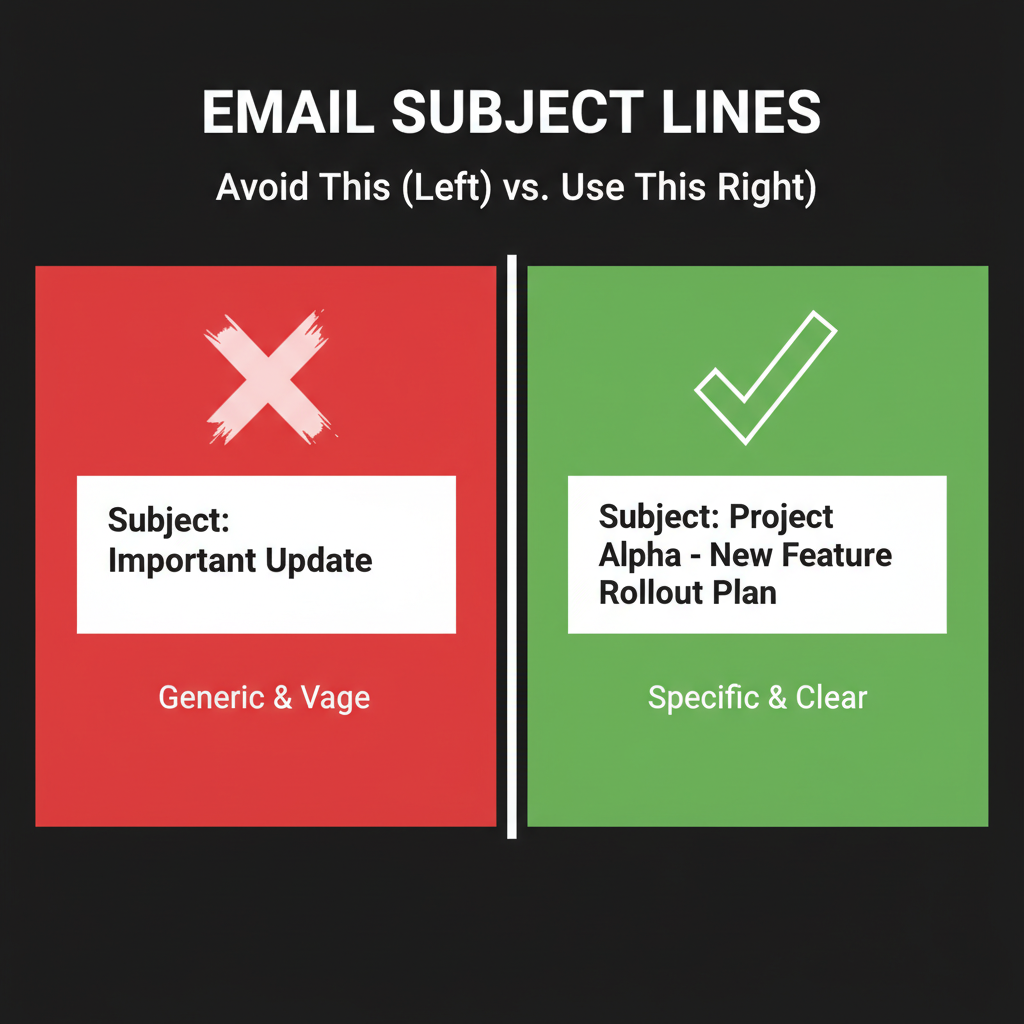
Compliance and Legal Requirements
I notice many guides skip this section. That is dangerous. Automated emails are subject to strict laws. If you ignore them, you risk heavy fines and your emails will get blocked.
CAN-SPAM, GDPR, and CCPA Considerations
I am not a lawyer, but I follow these rules strictly to keep my business safe:
- Physical Address: You must include a valid physical postal address in the footer of every email. This is a requirement of the FTC's CAN-SPAM Act.
- Unsubscribe Link: The link must work instantly. Never hide it.
- Explicit Consent (GDPR): If you have subscribers in Europe, you need their permission. I use a checkbox on my forms that says, "I agree to receive marketing emails." Pre-checked boxes are not allowed under GDPR guidelines.
Testing and Quality Assurance Processes
I never launch a sequence without testing it first. I learned this after sending a "Hello {First_Name}" email where the tag broke and everyone saw the code instead of their name. It was embarrassing.
How to Perform a Test Run
Do not just use the "Send Test Email" button. You need to test the trigger.
- Open an Incognito/Private browser window.
- Go to your sign-up form.
- Sign up with a secondary email address (like a personal Gmail).
- Watch your inbox. Does the first email arrive?
- Wait the specified time delay. Does the second email arrive?
Verifying Trigger Functionality
Sometimes the form works, but the automation doesn't start. I check my software's "Log" or "History" tab. It should show that a new contact was added and entered the workflow. If the log is empty, your integration between the form and the email tool is broken.
< figure class="article-image-container" >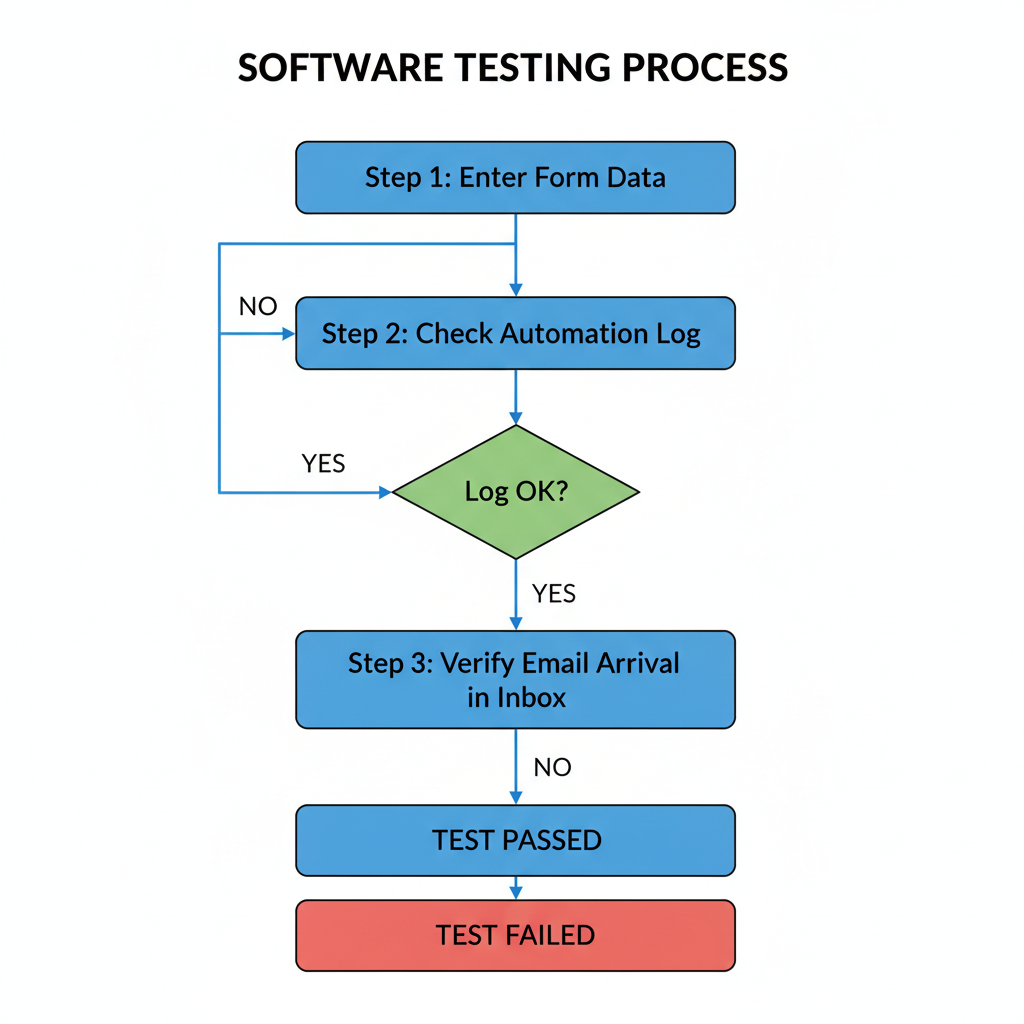
Measuring Sequence Performance
Once your sequence is live, you can't just ignore it. I check my stats once a week. You want to look for bottlenecks.
Key Performance Indicators (KPIs) to Track
I focus on these metrics:
- Open Rate: If this drops below 20% on a specific email, I rewrite the subject line.
- Click-Through Rate (CTR): This tells me if the content is engaging.
- Unsubscribe Rate: If a specific email causes a lot of people to leave, I know that content is annoying or irrelevant.
According to Campaign Monitor, automated emails generate 320% more revenue than non-automated ones. If you track these numbers, you will see exactly where that revenue comes from.
Common Technical Issues and Solutions
Things break. It happens to the best of us. Here are the three most common problems I encounter and how I fix them.
1. The Trigger Fails to Fire
This usually happens because of "double opt-in." If you require users to confirm their email before joining the list, the sequence won't start until they click that confirmation link. I check my settings to see if double opt-in is enabled.
2. Users Get Stuck in a Loop
I once saw a workflow that sent the same email every day forever. This happens if you don't define an "Exit" condition. Make sure your sequence has a clear end point.
3. Emails Go to Spam
If your open rates are near zero, your domain might be flagged. I recommend authenticating your domain with DKIM and SPF records. Your email provider will have a guide for this. It tells Gmail and Outlook that you are a legitimate sender.
Setting up your first automated sequence takes a bit of effort upfront. But once it is running, it changes how you do business. You stop chasing leads manually and start building relationships automatically. I hope this guide helps you build a workflow that works for you.