Criteria for Selecting a High-Volume Email Service Provider
I remember the exact moment I realized our email platform couldn't handle our growth. We hit 100,000 subscribers, and suddenly, our open rates dropped like a stone. I felt panic set in. I had spent years building that list, and it felt like I was shouting into a void.
If you are reading this, you are likely in the same boat. You have outgrown the free tools. You need more power. But choosing a provider for large contact lists isn't just about picking the one with the nicest templates. It is a technical decision.
I learned this the hard way. I wasted money on platforms that promised the world but failed when we tried to send 500,000 emails at once. You don't have to make my mistakes. I want to walk you through the specific criteria that actually matter for high-volume senders.
< figure class="article-image-container" >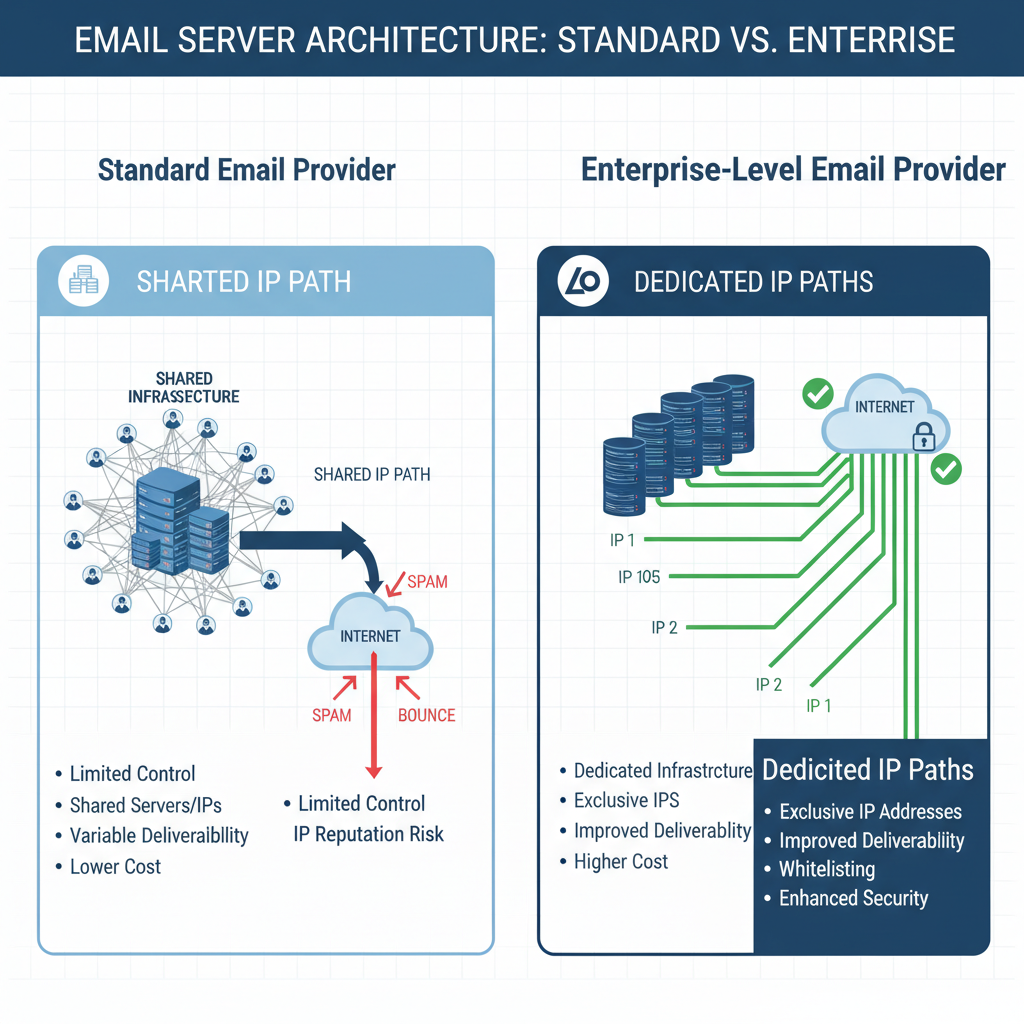
Technical Infrastructure Requirements for Large Contact Lists
When I first started, I didn't understand server architecture. I thought all email servers were the same. I was wrong. The biggest difference between a tool for small businesses and one for enterprises is how they handle your IP address.
Shared IP vs. Dedicated IP Performance
Most basic accounts put you on a "shared IP." Think of this like a public swimming pool. If one person makes a mess, everyone suffers. In email terms, if another company on your shared IP sends spam, your emails might get blocked too.
I've seen this happen. We followed all the rules, but our emails went to spam because of someone else's bad behavior. For lists over 50,000, you almost always need a dedicated IP address. This gives you your own private lane. Your reputation depends only on you. When you evaluate providers, ask them upfront about the cost and setup process for a dedicated IP.
Server Uptime and Redundancy Standards
Imagine launching a Black Friday campaign, and the system crashes. I've lived through that nightmare. It cost us thousands of dollars in lost sales.
You need to look for "redundancy." This means if one server fails, another one takes over instantly. Ask the sales rep for their uptime reports from the last 12 months. If they can't show you, run away.
Email Deliverability Factors at Scale
Getting an email into an inbox is harder than it used to be. Recent data from InfluenceBase suggests that about 15.8% of emails never reach the inbox. They get caught in spam filters first.
IP Warming Protocols for New Providers
This is where most people fail. I failed here too. When you move to a new provider, you cannot just send an email to all 200,000 people on day one. If you do, Gmail and Outlook will block you immediately. They see a new IP sending massive volume and assume you are a spammer.
You have to follow an IP warming process. This involves starting small and slowly increasing volume. I recommend a timeline of 4 to 6 weeks for a list of 100,000+. Good high-volume providers will have automated tools to handle this for you. If they tell you to "just send it," they are setting you up for failure.
< figure class="article-image-container" >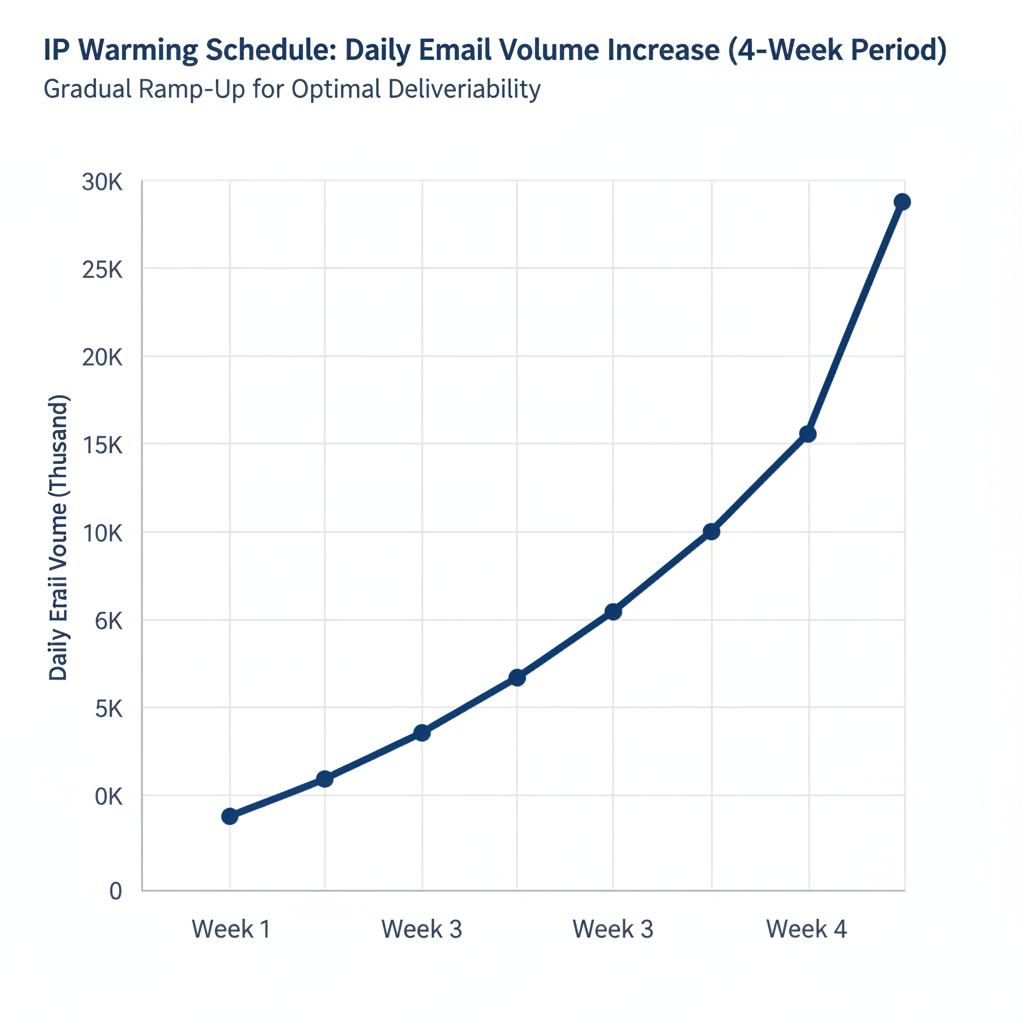
Support for SPF, DKIM, and DMARC Records
These acronyms sound scary, but they are mandatory now. In February 2024, Google and Yahoo started requiring strong authentication for anyone sending bulk mail. If you don't have these, your emails will bounce.
- SPF: Like an ID card for your IP address.
- DKIM: puts a digital seal on your emails so no one can tamper with them.
- DMARC: tells email servers what to do if an email fails the first two checks.
I recently helped a client who ignored DMARC. Their open rates were terrible. Once we fixed these protocols, their delivery rates jumped by 15% in two weeks.
List Management and Hygiene Features
Your list is not static. It changes every day. People change jobs, abandon old addresses, or their inboxes get full. According to MarketingSherpa, contact lists decay at about 22.5% every year. That means nearly a quarter of your list goes bad annually.
Automated Tools for Removing Inactive Subscribers
I know it hurts to delete contacts. I used to hoard them. I thought, "Maybe they will buy someday." But keeping inactive people actually hurts you. It lowers your engagement rate, which tells Google your emails aren't interesting.
You need list hygiene services built into your ESP. I look for tools that automatically tag anyone who hasn't opened an email in 6 months. Then, I run a re-engagement campaign. If they still don't click, I delete them. It keeps the list healthy and saves money.
Handling Bounce Rates and Spam Complaints
Internet Service Providers (ISPs) watch your bounce rate closely. If your hard bounce rate goes over 2%, you are in the danger zone. If your spam complaints cross 0.1%, you might get blocked.
I use providers that manage suppression lists automatically. If an email hard bounces (meaning the address doesn't exist), the system should never email them again. This protects your sender reputation.
Cost Structures for High-Volume Sending
Pricing for enterprise email is tricky. I've signed contracts that looked cheap but ended up costing double due to hidden fees.
Pricing Based on Contact Count vs. Email Volume
Some providers charge you for how many contacts you store. Others charge for how many emails you send. You have to do the math on the cost of email marketing for 500k subscribers.
I worked with a company that sent daily emails. A "pay per email" model would have bankrupted them. We moved them to a contact-based plan and saved $2,000 a month. But if you only send once a month, a volume-based plan might be cheaper. Check your sending frequency before you sign.
< figure class="article-image-container" >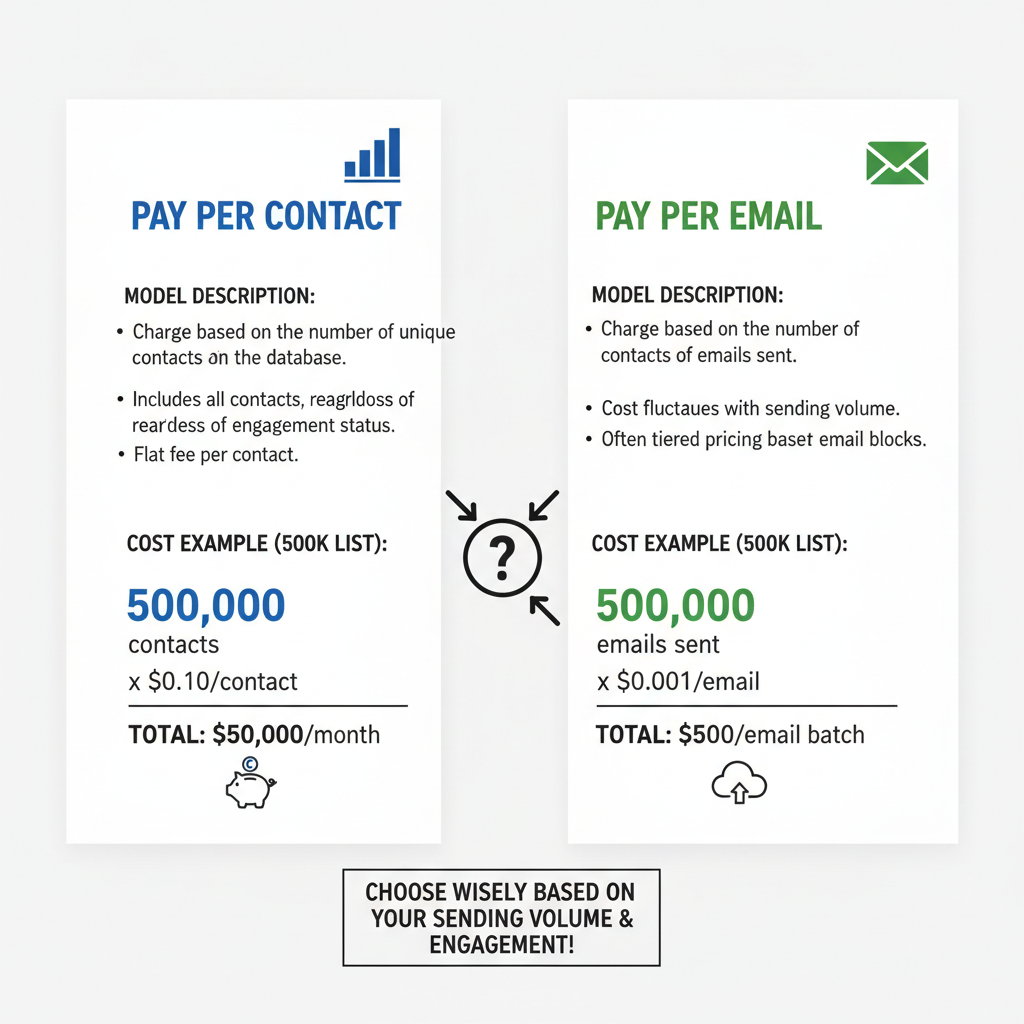
Overage Fees and Subscription Limits
Be careful with "overage fees." I once exceeded my monthly limit during a holiday sale. The provider charged a premium rate for every extra email. It wiped out a chunk of our profit. Always negotiate a buffer for overages in your contract.
Steps for Migrating a Large Contact List
Moving a large list is terrifying. Competitors rarely tell you how to do it safely. But I have done it a dozen times, and I have a process.
Exporting Data and Mapping Custom Fields
You aren't just moving email addresses. You are moving purchase history, names, and tags. I always start by auditing the data. I map every field in the old system to the new one.
If you don't do this, you lose your segmentation. And according to the DMA, segmented campaigns drive a 760% increase in revenue. You cannot afford to lose that data during the move.
Verifying List Health Before Import
This is my golden rule: Never import a list directly into a new provider without cleaning it first. Even if you think your list is clean, run it through a verification tool. I usually find 2-3% of emails are invalid or dangerous "spam traps."
If you import those bad emails into a new account, you ruin your reputation on day one. Clean it first. It is worth the extra cost.
Integration Capabilities with Existing CRM Systems
Your email provider needs to talk to your CRM. I use API integrations to make sure everything stays in sync. If someone buys a product, I want them removed from the "prospect" list immediately.
When I evaluate a high-volume email provider comparison for enterprises, I look at their API documentation. If it looks outdated or sparse, I move on. You need real-time data flow.
Customer Support and Service Level Agreements (SLAs)
When you are sending millions of emails, you cannot rely on a "help desk ticket" that takes 24 hours to answer. You need a phone number.
I insist on a Service Level Agreement (SLA). This guarantees a response time, usually under 2 hours for critical issues. I also ask for a dedicated account manager. Having a specific person who knows your account history is invaluable when technical issues pop up.
Choosing the right partner is about minimizing risk. I hope this criteria helps you make a confident choice. It took me years to learn these lessons, but now you can apply them today. Take your time, ask the hard technical questions, and protect your list assets.